
Eneco Controller Installation Guide
Eneco Belgium is a sustainable energy provider focused on delivering 100% green electricity and offering innovative energy solutions for homes and businesses, aiming to accelerate the transition to a carbon-neutral future.
The P1 Port on the Fluvius Smart Meter needs to be activated, make sure this is done before the installation.
This can take up to 3 days!
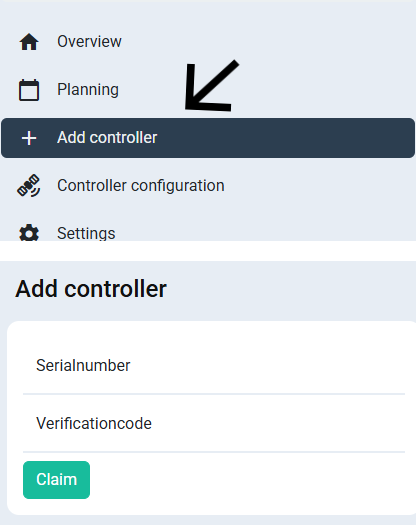
To claim the Controller, follow these steps:
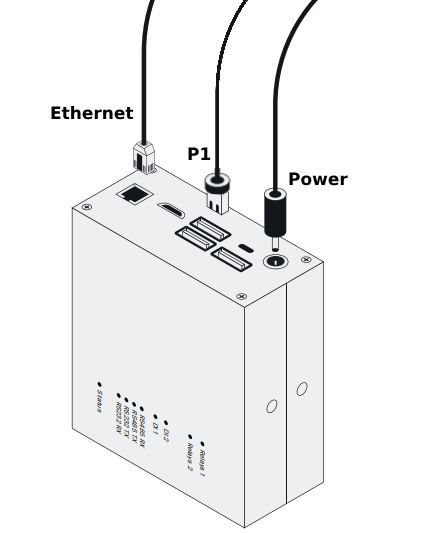
You can check the status of the Eneco Controller by the color of the status LED:
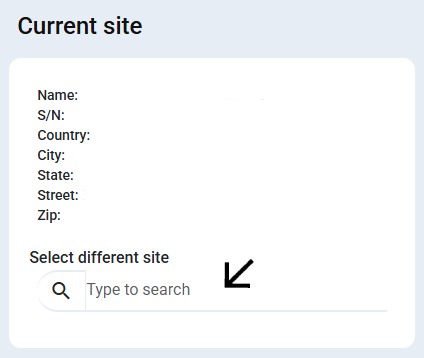
The import limit can be set to past year's average power consumption. If it is a Belgian site, then you can fill in the power as used in your capacity tariff calculations of the past year.
For more information on the limits click here
You should always connect the energy meter directly to the controller, not to the inverter. Connecting the energy meter to the inverter can cause control problems, especially if your site has many different kinds of devices to control.
These inverters are usually listed as "Espressif Inc."
Make sure to enable "Modbus TCP" in the Sigenergy/Energreen app.
For correct battery control the control mode should be set to "External Control"
Make sure the Energreen battery is installed WITHOUT meter and no grid export/import limits have been set.