

| Device Type | Variants | Modbus TCP (Ethernet) | RS485 | Curtailment | Instruction video |
|---|---|---|---|---|---|
| Energy Storage | EH | ⚠️ | ✅ | ✅ | |
| ET | |||||
| ET G2 | |||||
| BH | |||||
| BT | |||||
| ES G2 | |||||
| SBP G2 | |||||
| Energy Storage (Old models) | EM | ❌ | 🛠️ | ||
| ES | |||||
| ESA | — | ||||
| SBP | |||||
| Residential | MS G3 | ||||
| XS G3 | |||||
| DNS G3 | |||||
| SDT G3 | |||||
| Grid-Tied | MT | ✅ | |||
| MT G2 | |||||
| SMT | |||||
| SDT G2 | |||||
| MS | |||||
| DNS | |||||
| XS | |||||
| Grid-Tied C&I | GT | ||||
| HT |
Modbus TCP is only available using a Wi-Fi/Lan kit
| Step | Image |
|---|---|
| 2a. Connect to the inverter’s WiFi and open the SolarGo app. | 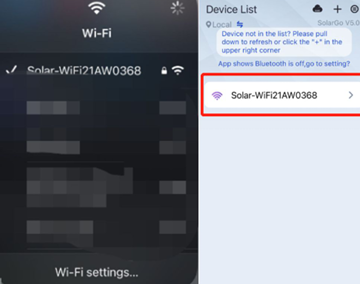 |
| 2b. Click More. | 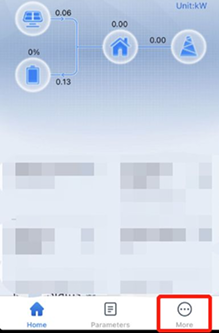 |
| 2c. Click Advanced Setting (you can find the password in the SolarGo manual). | 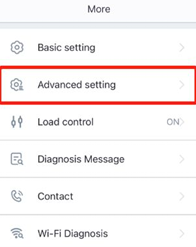 |
| 2d. Select Grid Parameter Setting. | 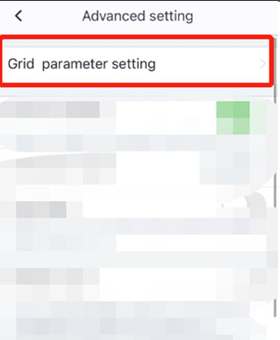 |
| 2e. Turn off Power Limit (If it is on, power from the battery cannot be fed into the grid). | 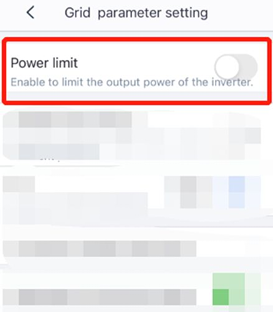 |
| 2f. Go back and click Cancel (these settings will be saved anyway, no restart is needed). | 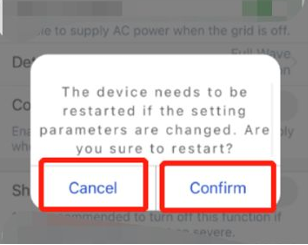 |
| Step | Image |
|---|---|
| 3a. Select Battery Setting. | 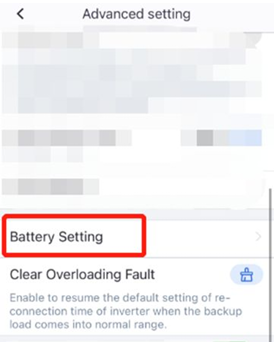 |
| 3b. Turn off SOC Protection. | 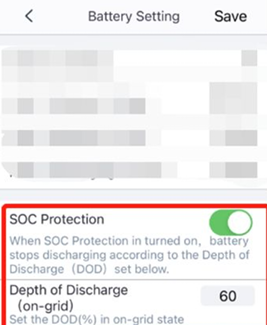 |
| 3c. Go back and click Cancel (these settings will be saved anyway, no restart is needed). | |
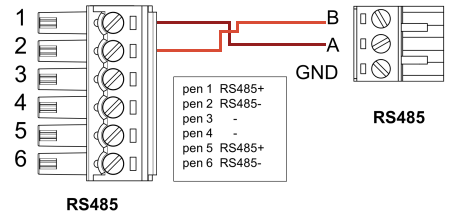
If you have multiple GoodWe devices, you can change their addresses separately or connect them in a daisy chain. Follow the wiring guidelines.