

| Function | Availability | Hardware validation |
|---|---|---|
| Battery measurements and battery alarms (SunSpec model 802) | Existing standard integration | Existing integration retained |
| Running SoC calibration status (service 116, running states 5, 6 or 7) | In beta and available on request, separate controller software revision, not yet a standard release | Service registers read successfully on gateways 2.3.37 and 2.3.63. A real calibration cycle and app display still require validation. |
| Cabinet and converter alarms and warnings (vendor event word 40194) | In beta and available on request, separate controller software revision, not yet a standard release | Zero event words read on both tested gateways. Active-event delivery and Unify display still require validation. |
The beta reads the optional service registers 30001 and 30002 without changing the PowerShaper control mode or existing battery control. It retains the existing battery alarm word at 40147 and adds the separate cabinet event word at 40194. The calibration-request warning is not treated as proof that calibration is running. Unsupported service registers do not prevent the existing battery integration from loading.
Do not enable Multiple services just to obtain this status. That mode changes which Modbus control registers are writable and needs separate compatibility verification. Service availability depends on the installed Pixii gateway firmware and configuration. Controller software installation requires an agreed execution window. A beta build or offline test is not proof of full hardware validation.
| Device Type | Modbus TCP (Ethernet) | RS485 | Curtailment | Reactive power control |
|---|---|---|---|---|
| PowerShaper XL | ✅ | ❌ | ❌ |
| — |
Device Compatibility This integration was tested with Powershaper XL device. However, other devices using the same communication protocol, such as Powershaper, Powershaper 2, may also be compatible. If you have such a device, it is likely to work, but we are awaiting official confirmation from the manufacturer.
Make sure that the Controller and the Pixii PowerShaper are connected to the same network.
For correct ethernet wiring, follow the guidelines for ethernet wiring.
| Steps |
|---|
| 2a. Open the Pixii PowerShaper web interface by entering the IP address of the system in a web browser. |
2b. To allow communication make sure the Enabled checkbox is checked and the Type is set to the appropriate type 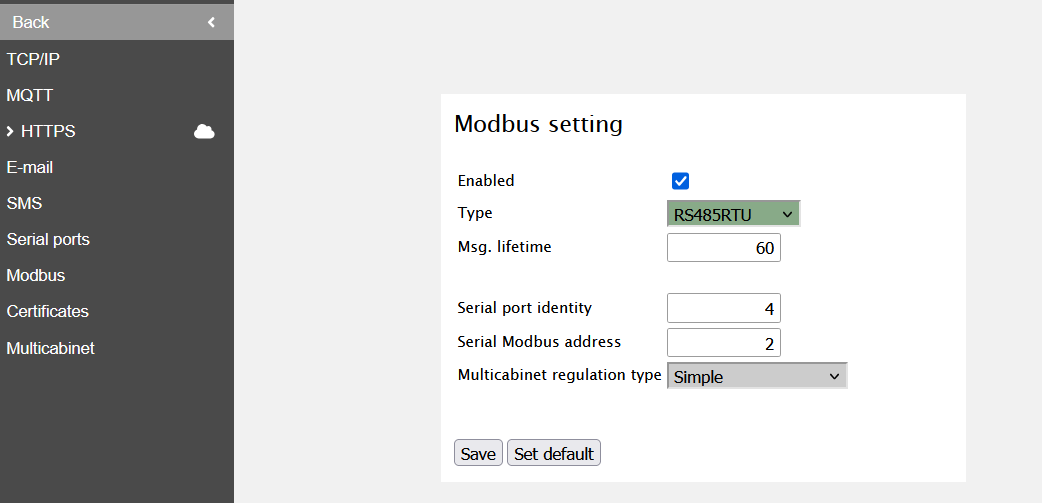 |